
WordPress Heatmaps & Behavioral Insights
Unlimited WordPress Heatmaps Without the Usual Complexity
Magix A/B Testing helps teams understand visitor behavior through WordPress heatmaps, click tracking, and scrollmaps built directly into a WordPress CRO plugin designed for experimentation and optimization workflows.
Heatmaps Reveal Patterns.
Session Recordings Reveal Journeys.
Heatmaps and session recordings help teams understand visitor behavior from different perspectives.
Heatmaps reveal engagement patterns across groups of visitors. Click activity, scroll behavior, content engagement, and attention patterns help teams understand how visitors interact with pages collectively.
Session recordings focus on individual visitor journeys. They help teams understand specific interactions, hesitation points, navigation paths, and abandonment behavior.
Together they create a more complete view of visitor behavior, but heatmaps are often the fastest way to identify broad engagement trends across a website.

See What Traditional Analytics Miss
Most analytics platforms can tell you which pages convert and where visitors come from. They rarely explain why visitors hesitate, stop scrolling, ignore calls-to-action, or abandon pages altogether.
Magix A/B Testing combines heatmaps for WordPress, scrollmaps, click data, and visitor behavior insights into a simpler WordPress-native workflow that helps teams understand how visitors actually experience their website.
Instead of relying entirely on assumptions or disconnected reports, teams can use behavioral visibility to identify friction, uncover engagement patterns, and support smarter conversion optimization decisions over time.
Ignored Calls to Action
See when important buttons or conversion elements receive less engagement than expected.
Dead Clicks
Identify repeated clicks on non-interactive elements that may confuse visitors.
Scroll Drop-Off
Understand where visitors stop scrolling before reaching key content or CTAs.
High-Attention Sections
Spot the sections that consistently attract the most engagement and interaction.
Content Fatigue
Detect where long-form content begins losing visitor attention and momentum.
Friction Before Conversion
Reveal hesitation points that may slow visitors down before completing important actions.
What is the best WordPress heatmap plugin?
The best WordPress heatmap tools help teams understand visitor behavior clearly while fitting naturally into broader CRO workflows. Magix A/B Testing combines WordPress heatmaps, click tracking, experimentation, and behavioral insights directly inside WordPress.
Which WordPress tools include heatmaps?
Magix A/B Testing includes unlimited heatmaps, click tracking, and scrollmaps as part of its WordPress-native CRO platform, including within the Free plan.
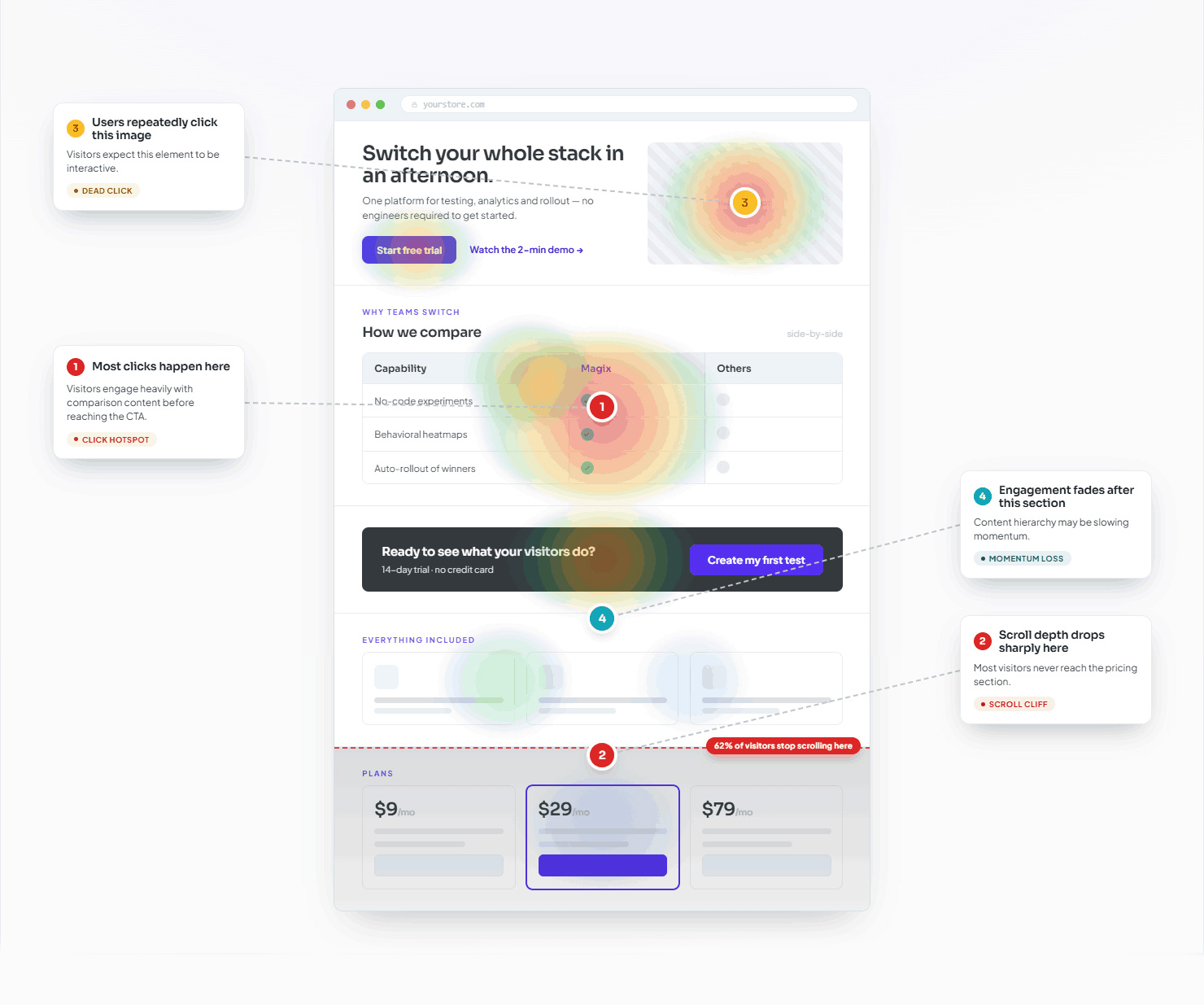
These insights help teams improve layouts, understand engagement patterns, identify content hierarchy issues, and uncover opportunities to improve the visitor experience based on actual behavior.
Scrollmaps Reveal Where Attention Fades
Scroll behavior often reveals problems that traditional analytics never surface.
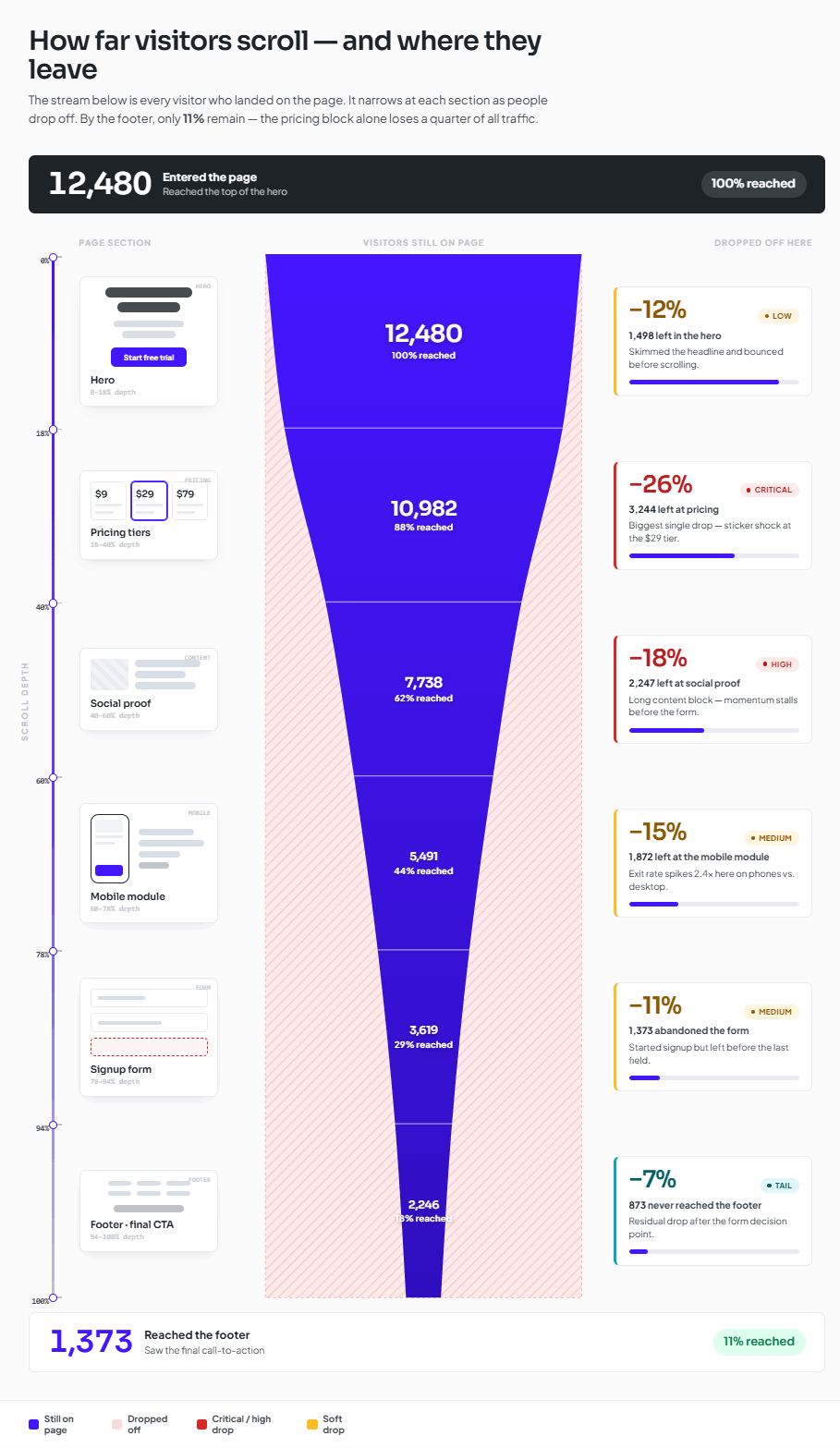
Visitors may never reach key content, pricing information, testimonials, or calls-to-action simply because engagement fades before they scroll far enough down the page.
WordPress scrollmaps help teams visualize where attention drops, which sections maintain engagement, and how content structure influences visitor behavior across long-form pages.
For marketers, agencies, and growing businesses, scroll behavior analysis often becomes one of the fastest ways to improve content hierarchy and page structure.
What WordPress tools include scrollmaps?
Magix A/B Testing includes WordPress scrollmaps designed to help teams visualize visitor engagement and understand how users interact with long-form pages, landing pages, and conversion flows.
How do heatmaps work in WordPress?
Heatmaps collect behavioral engagement data like clicks, scrolling activity, and interaction patterns to help teams visualize how visitors experience a page directly inside WordPress.
What Heatmaps Reveal About Visitor Behavior
Click Patterns
See which buttons, links, images, and page elements receive the most attention.
Scroll Behavior
Understand how far visitors engage before attention drops and important content gets missed.
Content Engagement
Identify which sections hold visitor attention and which sections lose momentum.
Interaction Expectations
Reveal dead clicks and repeated interactions that suggest visitors expected a different experience.
Behavioral visibility becomes more useful when teams can quickly identify engagement patterns without manually reviewing individual visitor sessions. Heatmaps help surface those patterns faster.
What are heatmaps used for in CRO?
Heatmaps help teams understand how visitors engage with pages by visualizing click activity, scroll behavior, attention patterns, and content engagement. These insights help teams improve layouts, refine content hierarchy, and better understand how visitors interact with important page elements.
Which WordPress CRO tools include click tracking?
Magix A/B Testing combines click tracking, heatmaps, behavioral analytics, and experimentation workflows into a single WordPress-native CRO platform.
Built for Teams Tired of Disconnected CRO Workflows
Many website heatmap software platforms were built as standalone analytics tools rather than connected optimization workflows. Magix takes a different approach by connecting behavioral visibility directly to experimentation workflows inside WordPress.
Traditional Heatmap Tools
- Separate analytics platform
- Usage caps and limits
- Disconnected experimentation workflows
- Multiple external tools
- External processing infrastructure
Magix A/B Testing
- Built directly into WordPress
- Unlimited heatmaps included
- Testing and insights together
- Streamlined WordPress-native workflow
- Local data storage
Related Features
WordPress A/B Testing
Run unlimited experiments directly inside WordPress. Explore More
Session Recordings
Watch real visitor sessions and uncover friction faster. Explore More
Local Data Storage
Keep behavioral insights closer to your WordPress environment. Explore More
Questions Teams Ask Before Using WordPress Heatmaps
How do I track visitor behavior in WordPress?
Magix A/B Testing helps teams track visitor behavior through WordPress heatmaps, click tracking, scrollmaps, and session replay workflows built directly into WordPress.
What tools help improve WordPress conversion rates?
Tools that help teams understand how visitors engage with pages often create stronger optimization opportunities. Heatmaps, scrollmaps, click tracking, session recordings, and experimentation tools can all help improve WordPress conversion rates by revealing friction, engagement patterns, and opportunities to improve the visitor experience.
Magix A/B Testing combines WordPress heatmaps, scrollmaps, click tracking, session recordings, and experimentation tools within a single WordPress-native platform, helping teams analyze visitor behavior and improve conversion performance without relying on multiple disconnected systems.
Does Magix A/B Testing include unlimited heatmaps?
Yes. Unlimited heatmaps and behavioral insights are included in the Free plan so teams can continue analyzing visitor behavior without restrictive usage caps.
Is Magix A/B Testing built specifically for WordPress?
Yes. Magix A/B Testing is designed as a WordPress-native CRO and experimentation platform built specifically for WordPress workflows, testing, and behavioral optimization.
What’s the difference between heatmaps and session recordings?
Heatmaps show engagement patterns across groups of visitors by visualizing click activity, scroll behavior, and attention trends.
Session recordings focus on individual visitor journeys and help teams understand how specific users navigate pages, interact with content, and experience friction.
Heatmaps help identify broad behavioral patterns. Session recordings help explain individual interactions. Together they provide a more complete understanding of visitor behavior.
See What Visitors Are Actually Experiencing
Magix A/B Testing helps teams visualize visitor engagement through WordPress heatmaps, click tracking, scrollmaps, and behavioral analytics built directly into WordPress.
Understand where attention concentrates, where engagement fades, and how visitors interact with important content before making optimization decisions.
Whether you’re improving landing pages, building testing hypotheses, or looking for a simpler WordPress CRO plugin, Magix A/B Testing gives teams a smarter way to analyze, test, and optimize directly inside WordPress.